

Dynamic Testing for Mission-Critical C/C++ Software
Automated unit, integration, and code-based testing to help teams reach coverage goals for mission-critical C/C++ software
What is CT?
CT is a test automation solution for unit, integration, and code-based testing of mission-critical C/C++ software. Provided by Suresofttech, CT brings together test-environment setup, test design and generation, execution, code coverage analysis, reporting, and traceability management.
It helps teams in automotive, aerospace, defense, railway, nuclear, and medical software improve test productivity while retaining reviewable verification evidence.
Why CT for safety-critical software development?
Although wording differs by industry, standards for mission-critical domains consistently emphasize software unit and integration verification, confirmation of test sufficiency, and traceable verification results. Safety-critical teams therefore need more than a large number of tests: they need to design and execute relevant tests, review code coverage, and retain evidence of what was verified and how.
CT connects these activities through test design and execution, code coverage analysis, reporting, and traceability. The following example shows how the automotive standard ISO 26262-6:2018 addresses these activities.
Verification activities and CT support
ISO 26262-6
ISO 26262-6 treats software unit verification and software integration and verification as separate activities in software-level development.
| ISO 26262-6 activity | Meaning of the activity |
|---|---|
| 9.4.2 Software unit verification | Verifies individual software units using an appropriate combination of methods, including requirements-based testing, interface testing, control and data flow analysis, and fault injection. Function- or module-level testing is a practical way to understand this activity. |
| 10.4.2 Software integration and verification | Verifies that integrated software units and components behave according to defined interfaces and interactions. Integration testing is a representative way to perform this activity. |
Safety-critical projects need to repeat these activities and retain test conditions, expected results, execution results, code coverage, and requirement links in a reviewable form. CT manages these verification tasks in one workflow rather than splitting them between separate tools and manual work.
| Verification need | How CT supports it |
|---|---|
| Unit and integration testing | Designs and executes tests at function, module, and interface levels while managing test conditions and data |
| Requirements- and structure-based verification | Supports requirements-based test design and generation, together with test design based on code structure |
| Code coverage review | Reviews statement, branch, and MC/DC results with source code and control-flow information to identify tests to improve |
| Verification evidence management | Connects requirements, tests, execution results, and coverage for review reports and traceability records |
Code coverage
Code coverage indicates which code and decision conditions were executed by tests. ISO 26262-6 recommends statement, branch, and MC/DC coverage according to ASIL, and the aerospace software standard DO-178C also treats structural coverage analysis as a verification activity according to software level. The applicable metric and target are determined by the domain standard, safety plan, and project requirements.
ISO 26262 coverage by ASIL
ISO 26262-6:2018 Table 9 recommends code coverage metrics for software units by ASIL. CT supports all three metrics below.
| Code coverage metric | ASIL A | ASIL B | ASIL C | ASIL D | CT support |
|---|---|---|---|---|---|
| Statement | ++ | ++ | + | + | Supported |
| Branch | + | ++ | ++ | ++ | Supported |
| MC/DC | + | + | + | ++ | Supported |
++ means highly recommended and + means recommended. This table is an automotive example; the actual method and target are determined by the safety plan, requirements, and assessment criteria of each project.
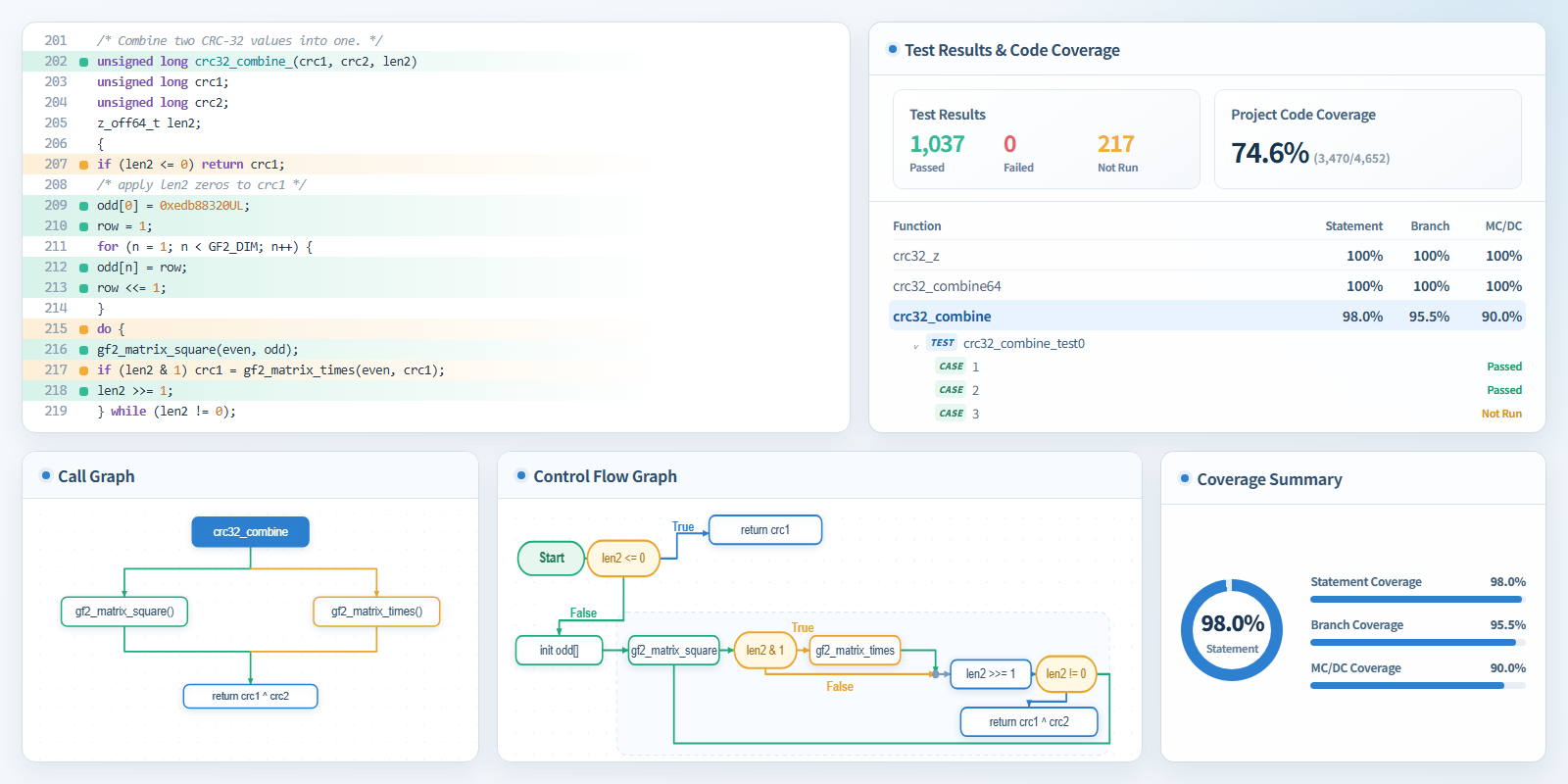
CT enables teams to review source-line execution status, function-level statement, branch, and MC/DC coverage, test cases, and control-flow information together. This helps identify insufficiently covered code and execution paths, then design and manage the tests needed to improve them.
CT capabilities for verification work
The following capabilities help teams design and execute unit, integration, and code-based tests, then connect verification evidence with repeated verification.
Unit and integration test design and execution
CT supports the design and execution of tests at function, module, and interface levels, along with test conditions and data. Teams can consistently review test intent and results from individual functions through interactions between modules.
Code-based testing in CT uses code structure and analysis information to support test design, then verifies the outcome with actual execution results and code coverage.
CT can generate and manage Google Test-based tests, and it can also import and reuse existing Google Test projects and test code. New tests and existing test assets can be managed and executed in the same CT project.
AI-assisted test design and coding-agent-based verification
Unit and integration testing requires teams to adapt tests to requirements and code changes, then repeatedly review execution results and coverage gaps. CT AI features support draft test design based on requirements, source code, and existing tests, and help identify areas that need improvement through structural analysis. Generated results are reviewed for test intent and expected results, then confirmed with actual execution results and code coverage.
CT provides CT ALIRA AI for test design inside CT and CT DVERA, a verification agent inside your coding agent. They are complementary: the work location and the way CT functions are invoked are different.
| Comparison | CT ALIRA AI | CT DVERA |
|---|---|---|
| Primary workspace | CT product interface | AI coding agents such as Claude Code, Codex CLI, Cursor, and GitHub Copilot |
| Who invokes CT functions | A CT user uses AI functions in the CT interface | A coding agent requests CT verification work through MCP- and Skill-based workflows |
| Primary role | Assists test design, generation, and error analysis from requirements and code structure | Connects CT analysis, build, execution, and result aggregation to the working context of code, requirements, and changes |
| How results are used | Reviews and improves test assets and execution results in CT | Uses CT results in later code changes, test improvements, and regression verification tasks |
Both CT ALIRA AI and CT DVERA assist test work, but CT performs the actual analysis, build, execution, and result aggregation. Final verification results are confirmed through actual execution results and code coverage.
CT ALIRA AI AI-powered test generation built into CT
In functional safety development, including ISO 26262-6, requirements-based testing and structure-based testing provide different kinds of verification evidence. CT ALIRA AI supports test design and generation from both perspectives.
| Test design approach | What CT ALIRA AI supports | What CT confirms |
|---|---|---|
| Requirements-based testing | Organizes test intent and scope from requirements and supports test design and generation. When requirements are registered in CT, links between requirements and tests can also be managed. | Requirement interpretation, test intent, and traceability links |
| Structure-based testing | Supports test design and generation from code structure, and improves tests needed for code coverage review. | Execution results and statement, branch, and MC/DC coverage |
CT DVERA a verification agent inside your coding agent
CT DVERA (Dynamic Verification Agent) is a verification agent inside your coding agent. It connects AI coding agents to CT verification tasks using the working context of code, requirements, and change history. It uses MCP- and Skill-based connections with CT engine functions for analysis, build, execution, and result aggregation. It can be used with Claude Code, Codex CLI, Cursor, and GitHub Copilot.
| Task | Role of CT DVERA and CT |
|---|---|
| Context-based test design and generation | A coding agent considers requirements, source code, and changes together, then designs tests and requests CT work. |
| CT function requests and result use | A coding agent requests CT analysis, execution, and coverage functions, then uses execution and coverage information for later test improvement and regression verification. |
The detailed integration scope and automation level of CT DVERA depend on the CT version, coding agent, and customer environment. The scope of result updates in external ALM tools also depends on the integrated tool, version, and project process.
CI-based repeated verification and review-record linkage
| Area | Support |
|---|---|
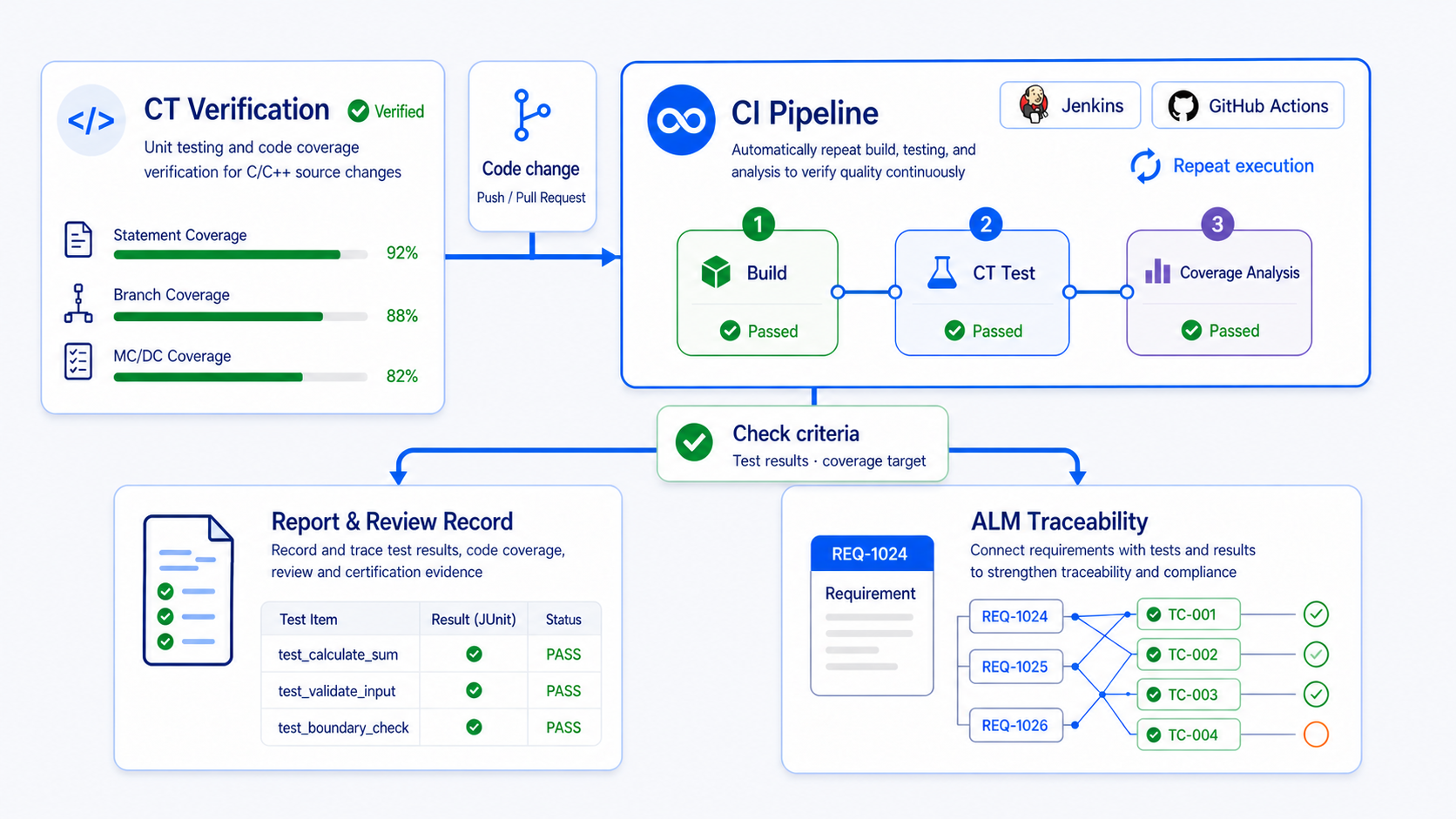
| Repeated verification automation | Provides a Jenkins plugin. CLI- and Docker-based execution enables CT verification jobs in CI environments including Jenkins, GitHub Actions, GitLab CI/CD, Azure Pipelines, TeamCity, and Bamboo; regression tests and code coverage analysis can run repeatedly after code changes. |
| Team collaboration | Team Testing for sharing test assets and results across multiple PCs |
| Requirements traceability | Connects requirements, tests, and results through Polarion, codebeamer, and V-SPICE, Suresofttech's ASPICE assessment support tool |
| Result use | Provides test and coverage results as review reports and JUnit-format CI integration results |
CI-based verification workflow
CT tool certification and application scope
CT tool certification
CT holds TÜV SÜD tool certification. The certification applies to specific CT versions and functions defined in the certification report. Projects should confirm the applicable version and scope with the certificate and Certification Report.
| Domain | TÜV SÜD certified standard scope | Verification activities CT supports in the project |
|---|---|---|
| Automotive | ISO 26262 | Unit and integration testing, statement/branch/MC/DC coverage, requirements traceability, and reporting |
| Railway | IEC 62279 / EN 50128 and EN 50716 | Unit and integration testing, code coverage, traceability, and reporting |
| Nuclear | IEC 60880 | Unit and integration testing, result, and report management |
| Medical devices | IEC 62304 | Test execution and result/traceability records |
| Electrical and electronic | IEC 61508 | Unit and integration testing, code coverage, and verification records |
Note for aerospace projects
DO-178C and DO-330 are not within the scope of CT's TÜV SÜD tool certification. CT can support unit and integration testing, code coverage, requirements traceability, and reporting in aerospace projects, but this must not be represented as “DO-178C certification” of CT.
DO-330 is not a general certification granted to a tool once. It is a framework for determining tool qualification according to how a tool is used in a project and which verification activities it reduces or automates. The required qualification level and evidence are determined project by project from the safety plan, intended use, and consultation with the certification authority.
Frequently asked questions
Which compiler and target environments can CT support?
CT supports a range of C/C++ environments, including widely used toolchains such as GCC, MSVC, Clang, Arm, Green Hills, Keil, and Renesas. Behavior that cannot be confirmed only in a host environment can be verified on real targets through Ethernet, Serial, or JTAG connections. The supported scope depends on compiler version, build options, target board, and debugger combinations.
How are requirements, tests, and results connected?
CT connects requirements and tests, and manages execution results and coverage information together. Polarion, codebeamer, and V-SPICE integrations can import requirements or export linked result and design data. The connection method and automatic-update scope depend on the integrated tool, version, and project process.
How can CT be applied to functional safety and aerospace-standard projects?
CT has TÜV SÜD tool certification scope for IEC 61508, ISO 26262, IEC 62304, IEC 60880, IEC 62279/EN 50128, and EN 50716. The certification applies to the functions defined for a specific CT version in the Certification Report. Each project applies CT according to its safety plan, including test level, coverage target, traceability, and reporting format. DO-178C and DO-330 are not within CT's TÜV SÜD certification scope; aerospace tool qualification is determined for each project according to intended use and the use of verification evidence.
Can tests created with CT ALIRA AI or CT DVERA be used immediately as verification evidence?
No. CT ALIRA AI and CT DVERA support test design and improvement work. Generated tests are reviewed for test intent, data, and expected results, then verified through actual execution results and code coverage.
How are CT reports and CI integration results used differently?
CT reports collect test results, coverage, and traceability information for project reviews and certification evidence. JUnit-format CI integration results are used for automated pipeline decisions and integration with other development tools. Available formats and detailed scope depend on the CT version and integration environment.
CT resource library
Select materials about functional safety, AI-assisted testing, and CI-based test operations.
White papers
- Code-Based Test of CTExplains how CT connects existing Google Test assets with code-based testing, code coverage, requirements traceability, and AI-assisted test code generation.
- CT's Analysis-Enriched AI Test GenerationExplains how CT uses C/C++ project analysis and build context for AI test generation, then improves tests with compilation, execution, and coverage feedback.
- AI-Powered Software Testing: CT's AI Assistant FeatureIntroduces how CT's AI Assistant supports C/C++ test environment setup, test generation, error analysis and correction, and requirements-based testing.
- Verifying ISO 26262 Software Using CTExplains how CT supports software unit and integration testing, structural coverage, execution environments, traceability, and documentation for ISO 26262 projects.
- Using CT for DO-178C Software VerificationExplains how CT supports requirements-based testing, structural coverage, result review, and tool-qualification considerations for DO-178C software verification.
- Efficient Testing Strategies with Team Testing and CI/CD in CTDescribes how teams share test assets and results, repeatedly execute tests in CI/CD pipelines, and manage the results with CT.
- Source Code Changes in Regression Testing: Adapting with Self-Healing TechnologyExplains CT's self-healing approach for adapting and reusing existing tests after source code changes to reduce regression-test maintenance effort.
Product materials
- CT AI Test Generation Product Brochure Introduces the overall CT AI test-generation configuration, including embedded C support, structure-, requirement-, and specification-based generation, AI-assisted correction, and DVERA integration.
- CT AI Test Generation Product Brief Summarizes CT AI test generation for closed-network and on-premises LLM environments, including DVERA integration.
Demo videos
The following is the complete CT demo-video list in newest-first order. The web page displays 10 videos per page.
- Meet CT DVERA | AI Test Generation for Safety-Critical C/C++ Inside Your Coding AgentDVERA concept and CT verification requests from coding agents
- Requirements-Based Test Generation with CT ALIRA AIRequirements-based test generation with ALIRA AI
- Self-Hosted Models, Mission-Critical Ready — CT ALIRA AISelf-hosted model use with ALIRA AI
- Test Reconfiguration with CT ALIRA AITest reconfiguration with ALIRA AI
- Test Environment Setup with CT DVERADVERA-based test environment setup
- Requirements-Based Test Generation with CT DVERARequirements-based test generation with DVERA
- Automating Unit Tests with AI & MCP: From Natural Language to ExecutionAI and MCP workflow from natural language to unit-test execution
- Self-Healing Tests in Jenkins: AI Fixes Compilation Errors AutomaticallyAI-assisted compilation-error recovery in Jenkins
- Auto-Generate Code-Based Tests & Reach Target Coverage (Jenkins AI Plugin)Code-based test generation and coverage improvement in Jenkins
- How AI Masters Complex C++ Testing: CT's Analysis-Enriched Generation DemoAnalysis-enriched C++ test generation
- Code-Based Testing: Write Tests Your Way in CTCode-based test authoring and management
- Docker Container Testing: Reliable Results Every Time in CTDocker-based CT test execution
- AI Chatbot for Instant Feature Guidance in CTCT AI chatbot guidance
- Synchronizing Source Changes to CTSource-change synchronization
- Debugging with VS CodeVS Code debugging
- CT and Codebeamer Integrationcodebeamer integration
- Stub Troubleshooting GuideStub troubleshooting
- How to fix Testcase Error using AI AssistantAI-assisted test-case error correction
- How to fix Stub Error using AI AssistantAI-assisted stub error correction
- CT Jenkins Plugin on Linux - Integrating CT into CI/CD EnvironmentsJenkins plugin setup on Linux
- CT Jenkins Plugin (Self-healing)Self-healing with the Jenkins plugin
- CT Jenkins PluginJenkins plugin overview
- Scenario Test (Time-based Test Design)Time-based scenario-test design
- Scenario Test (Checking Variable Values at Specific Times)Variable-value checks at specified times
- Team Testing - Checking Coverage in DashboardCoverage review in Team Testing dashboard
- Team Testing - Resolving Conflicts (User Stubs)User-stub conflict resolution
- Team Testing - Committing & Updating User StubsUser-stub commit and update
- Team Testing - Committing & Updating Source Code ChangesSource-code change commit and update
- Team Testing - Creating and Importing Team ProjectsTeam project creation and import
- C++ Test ReuseC++ test reuse
- Controller Tester MockMock-based testing
- Setting Expectations for Class Functions Used in Tests with Mock FeatureExpectations for mocked class functions
- Testing Functions Dependent on Abstract Classes Using Mock FeatureTesting abstract-class dependencies with mocks
- Testing Unreachable Defense CodeTesting unreachable defensive code
- Variable Capture and DebuggingVariable capture and debugging
- Importing Projects with Requirement Traceability InformationProject import with requirement traceability
- Requirements Test Coverage ReportRequirements test coverage reporting
- Testing Based on Requirements Imported from CSV FilesTesting from CSV-imported requirements
- Batch Input of Test Case IDsBatch test-case ID input
- Reviewing Tests When Requirements ChangeTest review after requirement changes
- Automatic Linking of Requirements and TestsAutomatic requirement-to-test linking
- Requirements-Based Testing with PolarionRequirements-based testing with Polarion
- Identifying Causes of Test Execution ErrorsTest execution error analysis
- Streamlined Project Export: Save and Share Your Test EnvironmentProject export and test-environment sharing
- Quick Project Import: Seamlessly Continue Your Testing JourneyProject import
- CT TutorialCT tutorial
- CT Performance: Handling One Million Test Cases EffortlesslyLarge-scale test-case management
- CT: Target Environment Setup for Automated TestingTarget-environment setup
- CT in Action: Running Tests on Real Target HardwareTest execution on real target hardware
- CT TutorialCT tutorial
- CT 3.3 Debug InformationDebug information review
- CT 3.3 Export ProjectProject export
- CT 3.3 Import ProjectProject import
- Checking Variable / Expression ValuesVariable and expression values
- Online HelpOnline help
- Tool Language SettingsInterface language settings
- Test Reuse (Target Function Changed)Test reuse after target-function changes
- CT 3.4 Linux Build Target TestingTarget testing in a Linux build environment
- Test Reuse (Global Variable Changed)Test reuse after global-variable changes
- Controller Tester Test ReuseLegacy Controller Tester test reuse
- CT 3.2 Target Environment SetupTarget-environment setup
- CT 3.2 Run Target TestsTarget-test execution
Next step
Discuss the CT test scope and integration approach for your project environment.
More CT demos are available on the CodeScroll YouTube channel.